
For people who ship fast with Lovable, Cursor, Bolt or v0
The X-Ray of your app,before someone else finds it
A real browser walks through your product, including the logged-in area, and runs the security tests. You get the score, the findings prioritized and the report ready to print.
Test your app now
Free to start. Mapping does not consume your monthly quota.
- pentest templates
- 10,518
- pages per analysis
- 300
- session surfaces read
- 4
- passwords stored
- 0
We detect and test your backends
The summary you get, exactly as it comes out
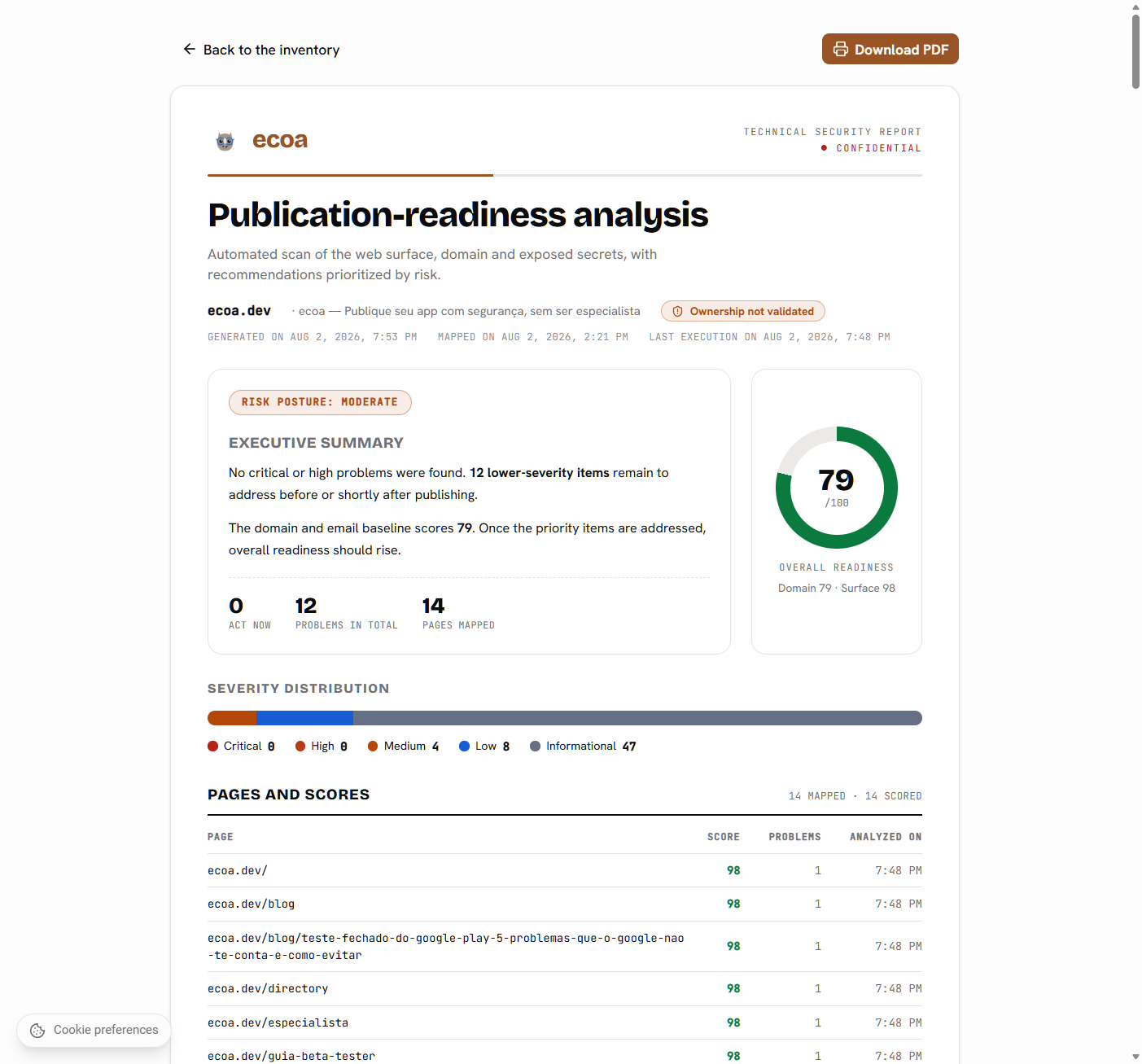
The scan returns an overall score, a score for each area of your app and the list of what to fix. Whatever has not been validated yet is named, never hidden.
Two analyses. You choose where to start.
You can start simple and come back for the full one later. Nothing that gets discovered is lost.
Domain analysis
QuickDoes not require ownership
Assesses your domain's baseline. Does not browse the site.
- DNS and domain: DNSSEC, CAA, dangling subdomain and registration expiry
- E-mail: SPF, DKIM and DMARC
- TLS/HTTPS: certificate validity and expiry, redirect and protocols
- Public files: robots.txt (and the private paths it gives away), sitemap, /llms.txt, structured data and technical SEO
- Privacy and LGPD (Brazil's data protection law)
- Three questions and done, with no login and no invasive test
Full security analysis
RecommendedRequires ownership for the invasive tests
It does not block: without validating, the analysis runs just the same; only the pentest is left out and the BaaS stays read-only.
Everything in the domain analysis, plus the logged-in area and the offensive tests.
- Maps the whole site, page by page
- Choose the public surface, the private one, or both
- Assisted login capture to reach the authenticated area
- Security headers on every page you pick
- Backend, APIs, payment and authorization test
- Optional: pentest and BaaS write tests
How it works
You answer a few questions. We handle the rest.
- 1
Paste the app's address
Point at the real app, not just the landing page. If your product lives at app.yourdomain.com, use that address, because that is where the APIs with owner data are.
- 2
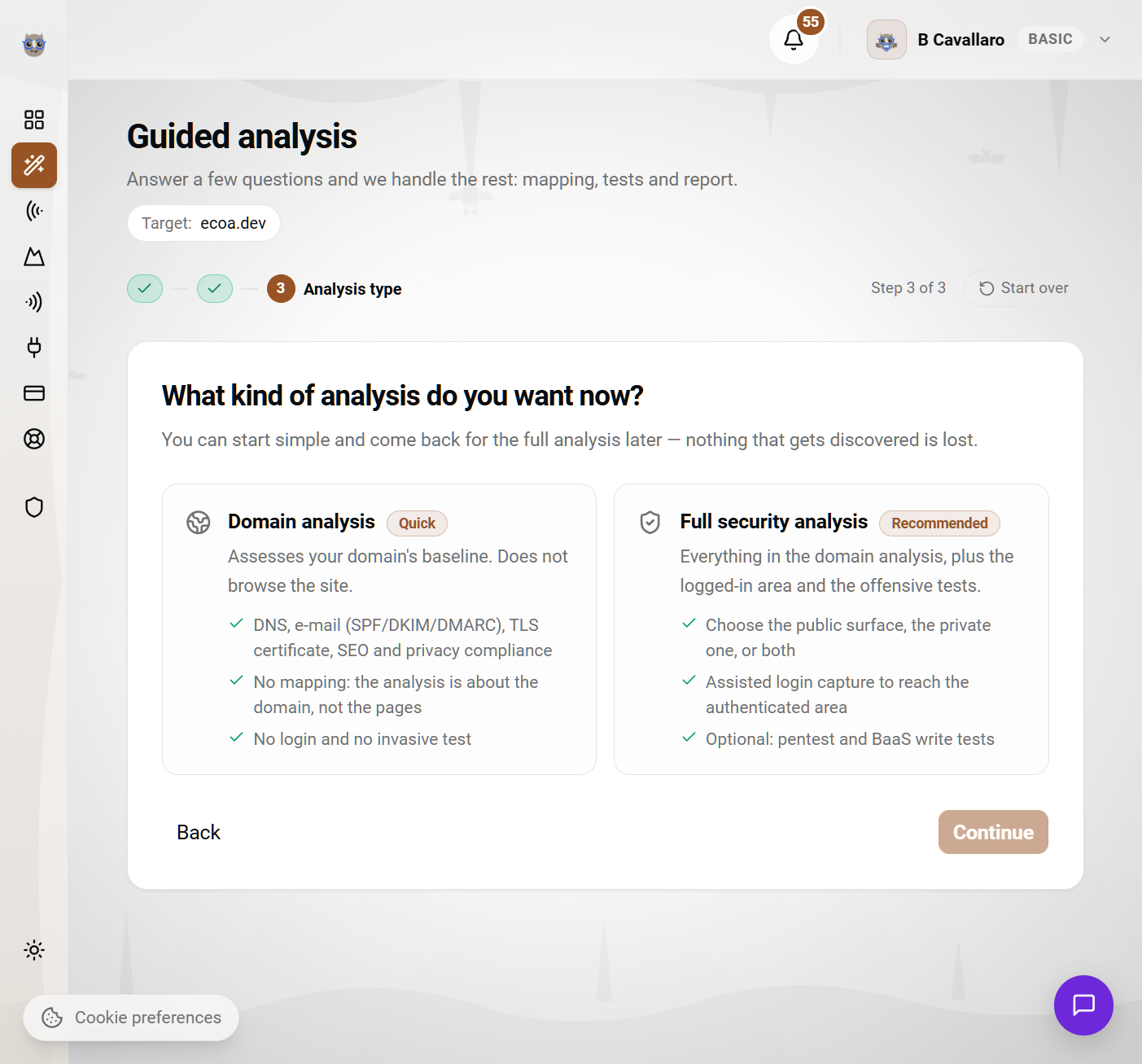
Choose the analysis type
The quick one looks only at the domain and does not require ownership. The full one maps the site, goes into the logged-in area and, if you want the invasive tests, asks for the domain validation.
- 3
Sign in with a test account
Use a disposable account, with fictitious data, and never an administrator one or one holding real customer data. You sign in once in the assisted window and we inherit the session.
.png&w=3840&q=75)
- 4
Check the pages we found
Before spending the execution, you see what was mapped, group what is a catalog, remove what does not matter and add what was missing.
.png&w=3840&q=75)
- 5
Follow along live
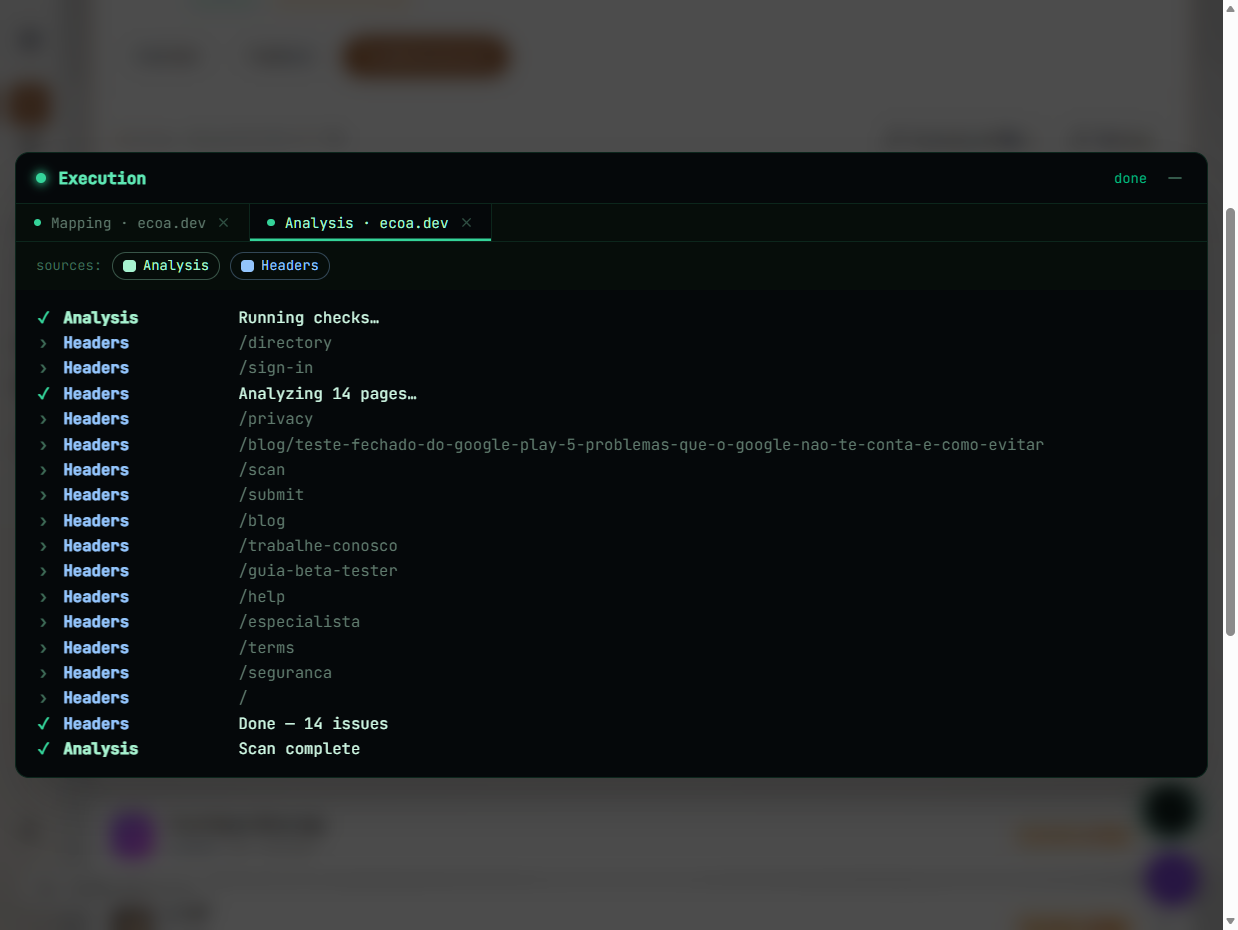
The console shows each test as it runs. At the end, the inventory is filled in and the report is ready.
What the scan does
Everything below is what the scanner actually runs today. Not one line more.
A real browser, not an HTML reader.
Real browsing, with a technical wait
We open every page in a browser and only read it once it has really finished loading: network idle, DOM stable, animations done. No guessing from the word “loading”.
Two trees: the public one and the logged-in one
We map what any visitor reaches and, with your session, what only exists after login. It is the difference between photographing the façade and walking into the house.
Inventory of your APIs
We record what your app actually called: method, host, path template and flags (authenticated, write, carrying sensitive data). If you publish OpenAPI/Swagger, we read the declared contract too.
A catalog does not become 300 pages
When we find many pages with the same shape (products, posts, profiles), we ask whether it is a catalog and collapse them into a single line. Testing the same page model three hundred times measures nothing extra and does not eat your quota.
Seeded by sitemap and robots
Beyond the links, we start from your sitemap.xml and your robots.txt. And the language prefix (/pt-BR/…) does not collapse the whole site into a single route.
Streaming delivery
Mapping saves every 10 pages. If it runs out of time, you do not lose what has already been discovered.
It is where the APIs, the permissions and the authorization flaws are.
Assisted session capture
You sign in once inside a remote browser, solving MFA, modal and anti-bot challenge as a human. We store only the session, encrypted. Your password is never stored.
Cookies, localStorage, IndexedDB and sessionStorage
The session is read from all four surfaces, including httpOnly cookies. It works with modal login, two-step login or an external provider.
Reusable access profiles
Register “Admin”, “Free customer”, “Paying customer” once and reuse them in every analysis, with the session status always visible.
Multiple logins, one analysis per login
It is the only way to see what one customer's account reaches inside another's data. One login on the Basic plan, two on Pro, three on Premium.
Opened or blocked
We browse every page with your session and record what happened: the status, where navigation stopped, and whether real content came back or a login screen.
Non-destructive tests by default. The invasive ones only run when you authorize them.
Security headers
Every planOn every page you pick: CSP, HSTS, X-Frame-Options and frame-ancestors, X-Content-Type-Options, Referrer-Policy, Permissions-Policy, cross-origin isolation and Server/X-Powered-By exposure.
Server secret on the client
Every planWe look for service keys, admin keys, storage tokens and payment keys leaked in the bundle. We store the evidence masked: the origin, never the value.
Exposed BaaS configuration
Read-only modeRLS turned off, public catalog, open bucket, open Firestore and Realtime Database, public collection, GraphQL introspection turned on.
Configuration files published by mistake
Every planWe probe /.env, appsettings.json, config.json and the like, with three guards against false positives so your framework's error page does not get called a leak.
Object-level authorization (BOLA)
Pro or aboveTwo accounts, the same identifier: does one user reach the other's data? It is the definitive proof of leakage between customers, and it requires two logins.
Payment security
ConsentLeaked secret key, sandbox running in production, amount set by the client, confirmation in the browser and missing idempotency. We never complete a purchase nor touch a real card.
Penetration test
OwnershipA scan with the nuclei corpus: 10,518 templates, plus around 249 specific to web applications. It only runs with ownership validated and your explicit acceptance.
Domain, e-mail and privacy
Every planDNS (DNSSEC, CAA, dangling subdomain) and domain expiry, SPF/DKIM/DMARC, TLS certificate validity and the HTTPS redirect, technical SEO, AI search and LGPD compliance.
.png&w=3840&q=75)
It is not a list of alerts: it is what to do, in what order.
Technical report as a PDF
Cover, risk verdict, executive summary, readiness score, severity distribution, per-page score and every finding numbered with evidence, how to fix it and an OWASP/CWE reference. Ready to print or to send to your client.
Browsable inventory
Your site's tree with a score per page and coverage by scanner, plus the APIs, BaaS, domain, payments, results and executions tabs.
Page manager
Add pages by hand, fire a mapping from a specific page, mark what is not relevant, delete what does not matter and label each page (Login, Payment, Form with personal data, Admin, Protected).
Readiness score from 0 to 100
One score per page and one for the whole app, with the problems ordered by risk. What to fix first sits at the top.
Fixes by your own AI
Connect ecoa to Cursor, to Claude or to another assistant through our MCP server: it reads the findings and gets the remediation guide along with them, with the guardrails that prevent a “fix” that breaks your app.
We tell you what we could NOT test
And why. A partial scan never turns into “your site is clean”. A detected Server Action, for instance, is reported as not tested, never as passed.
No black box.
Before: you see what is going to run
The review screen lists every test in the queue, what was left out and why. What is blocked is not a choice; it is an explanation.
During: live console
Line by line, with the address of each page as it is analyzed. You can leave it running and go get a coffee.
After: auditable history
Every execution keeps what was requested, what ran, how long it took and how many findings came out. You can compare it with the previous execution.
How far each level goes
The scan on this page runs right now, with no signup. Creating an account is free and opens the technical analysis inside your app. Paid plans raise how much each analysis covers.
Free scan
on this pageNo signup, no card
Looks at your domain from the outside. It does not browse the site or enter the logged-in area.
- Security headers on the home page (CSP, HSTS, Permissions-Policy)
- TLS certificate: validity, expiry and the redirect to HTTPS
- DNS and domain: DNSSEC, CAA, dangling subdomain and registration expiry
- Domain email: SPF, DKIM and DMARC
- Public files and AI search: robots.txt, sitemap, /llms.txt and technical SEO
- A score from 0 to 100 and one problem from each front on screen
With an account
freeSignup, no card
This is the technical analysis, inside My apps. It goes into the site: it maps the pages, logs in and tests the backend.
- Everything in the free scan, plus its full report with the evidence behind each finding
- 10 analyses per month
- Maps up to 5 pages of the site
- 1 login per analysis, to reach the authenticated area
- Up to 25 API endpoints tested
- Backend and BaaS (Supabase, Firebase and others), payment and privacy
- Pentest with the critical and high severity corpus
- No active DAST pass, no comparison between two logins and no step by step fix
Paid plans
Pro and PremiumThe same analysis, with far more reach
No new test is switched on here. What grows is how much each analysis covers, and the finding starts coming with the fix.
- Everything in the free tier, without the three limits above
- 60 to 200 analyses per month
- 50 to 300 pages mapped per analysis
- 250 to 1500 API endpoints tested
- 2 to 3 logins per analysis, with the cross account reading (what account A reaches in B)
- Active DAST pass against the APIs we find
- Pentest with the corpus up to medium (Pro) and low (Premium) severity
- A step by step fix on every finding, ready to paste into your AI
No plan switches a test off: what changes is how much each one covers, and when a limit cuts, the report says "covered up to your plan limit". Verifying domain ownership unlocks the pentest and takes the BaaS out of read-only mode, and that works the same on every level.
What each plan unlocks
The chips from the section above, translated: pages, logins and which tests run.
Basic
To check one project end to end without paying anything.
Free
Community feedback
- Up to 1 active app
- Up to 3 objectives per app
- Community feedback
Security tests
- 10 analyses per month (mapping the site is free)
- 1 automatic analysis per week, per app
- Up to 5 pages per analysis
- Up to 25 APIs in the inventory
- 1 login per analysis
- Every test: domain, e-mail, TLS, SEO, privacy, headers, client-side secrets, BaaS, payment and object-level authorization
- Penetration testing: critical and high severity templates
- DAST pass: fuzzing for XSS, SQLi, SSTI and open redirect
- Comparison between two logins: who can reach whose data
- Guided remediation of findings, with the fix guide and MCP server
Pro
For people running several apps and rescanning on every deploy.
Was $ 15.90
$ 10.90/ month
Billed annually at $ 130.80
7 days free
No charge today. The first invoice only arrives in 7 days, and you can cancel before then.
Community feedback
- Up to 5 active apps
- Up to 7 objectives per app
- Priority community feedback
- Directory highlight
Security tests
- 60 analyses per month (mapping the site is free)
- 3 automatic analyses per week, per app
- Up to 50 pages per analysis
- Up to 250 APIs in the inventory
- 2 logins per analysis
- Every test: domain, e-mail, TLS, SEO, privacy, headers, client-side secrets, BaaS, payment and object-level authorization
- Penetration testing: critical, high and medium templates
- DAST pass: fuzzing for XSS, SQLi, SSTI and open redirect
- Comparison between two logins: who can reach whose data
- Guided remediation of findings, with the fix guide and MCP server
Premium
For people shipping client work: penetration testing with the full corpus.
Was $ 45.90
$ 32.90/ month
Billed annually at $ 394.80
7 days free
No charge today. The first invoice only arrives in 7 days, and you can cancel before then.
Community feedback
- Up to 10 active apps
- Up to 15 objectives per app
- Ultra-detailed feedback
- Maximum homepage spotlight
- Dedicated support via Discord
Security tests
- 200 analyses per month (mapping the site is free)
- 7 automatic analyses per week, per app
- Up to 300 pages per analysis
- Up to 1500 APIs in the inventory
- 3 logins per analysis
- Every test: domain, e-mail, TLS, SEO, privacy, headers, client-side secrets, BaaS, payment and object-level authorization
- Penetration testing: the full corpus, critical down to low
- DAST pass: fuzzing for XSS, SQLi, SSTI and open redirect
- Comparison between two logins: who can reach whose data
- Guided remediation of findings, with the fix guide and MCP server
Mapping is free on every plan. What consumes quota is each test run.
Frequently asked questions
Does the quick analysis require domain ownership?+
No. The domain analysis does not even ask: it is three questions and it runs. Ownership only shows up in the full security analysis, and even there it does not block: without validating, everything runs just the same, only the pentest is left out and the BaaS tests stay read-only.
How do you validate ownership?+
In two ways, and you choose: by publishing a file at /.well-known/ecoa-validation.txt or by creating a TXT record in your DNS. It takes a minute and it is free on any plan. It exists to make sure nobody uses ecoa to scan someone else's app.
Do you store my password?+
Never. In the assisted capture you type the password inside a remote browser and we read only the session left over after the login (cookies, localStorage, IndexedDB and sessionStorage), which is stored encrypted. The password never goes through our database.
Can the scan break my app or erase data?+
The standard tests are non-destructive: they read, they do not write. Anything that writes (BaaS write tests, payment replay, pentest) only runs after you tick the acceptance on that execution, and we never complete a purchase nor touch a real card. Even so, the recommendation is to run against a test environment when there is one.
How many pages do you analyze?+
5 on the Basic plan, 50 on Pro and 300 on Premium. Pages from the same model (products, posts, profiles) count as a single one, so a large catalog does not eat your quota. Mapping itself is free. What counts is each test execution.
What do I need two logins for?+
For the object-level authorization test. With two accounts we request, logged in as A, the data that belongs to B. It is the definitive proof that one customer reaches another's data. With a single login, that test does not run.
Does it work for an app built with AI?+
That is exactly the case. People who ship with Lovable, Cursor, Bolt or v0 tend to go live with RLS turned off, a service key in the bundle and an endpoint with no owner check, which is what this scanner looks for first.
What if a finding is wrong?+
Tell us. Every challenge becomes scanner calibration: we spell out what we could not test, and a reported false positive improves the next report.
Shall we see what is under the hood?
Paste your app's address and start now. Mapping is free and does not consume your monthly quota.
Analyze my app